
6. Graph Construction for Matching#
6.1. Practical Session 1.2: Graph Matching: Graph Construction#
6.1.1. Introduction#
In this session, we will extend our previous work on feature matching by constructing graphs based on keypoint annotations. You will implement two different graph construction methods:
Delaunay Triangulation
k-Nearest Neighbors (k-NN)
Your goal is to construct graphs using these methods and visualize them by overlaying the edges onto the images.
6.1.2. Graph Construction Algorithms#
6.1.2.1. Delaunay Triangulation#
Delaunay Triangulation is a geometric technique that connects keypoints in a way that maximizes the minimum angle between edges, avoiding thin triangles. This method is commonly used for mesh generation and spatial interpolation.
Algorithm Steps:
Extract keypoints from the annotated dataset.
Apply Delaunay triangulation using the
scipy.spatial.Delaunaymodule.Construct the adjacency matrix based on the triangulation.
6.1.2.2. k-Nearest Neighbors (k-NN)#
k-NN connects each keypoint to its k closest neighbors based on Euclidean distance.
Algorithm Steps:
Extract keypoints from the annotated dataset.
Compute the pairwise Euclidean distances between keypoints.
For each keypoint, select its
knearest neighbors.Construct the adjacency matrix accordingly.
6.1.3. Implementation#
import numpy as np
import matplotlib.pyplot as plt
from scipy.spatial import Delaunay
def plot_image_with_graph(img, kpt, edges):
    """
    Function to visualize an image with keypoints and graph edges

    Parameters:
    - img: Input image
    - kpt: Keypoints (2, N) array
    - edges: List of (i, j) tuples representing graph edges
    """
    plt.imshow(img)
    plt.scatter(kpt[0], kpt[1], c='w', edgecolors='k')

    for i, j in edges:
        plt.plot([kpt[0, i], kpt[0, j]], [kpt[1, i], kpt[1, j]], 'r-')
    plt.show()

def delaunay_graph(kpts):
    """Constructs a Delaunay triangulation graph from keypoints."""
    # Implement Delaunay triangulation
    return list(edges)

def knn_graph(kpts, k):
    """Constructs a k-NN graph from keypoints."""
    # Implement k-NN graph construction
    return list(edges)
The result should be like this:
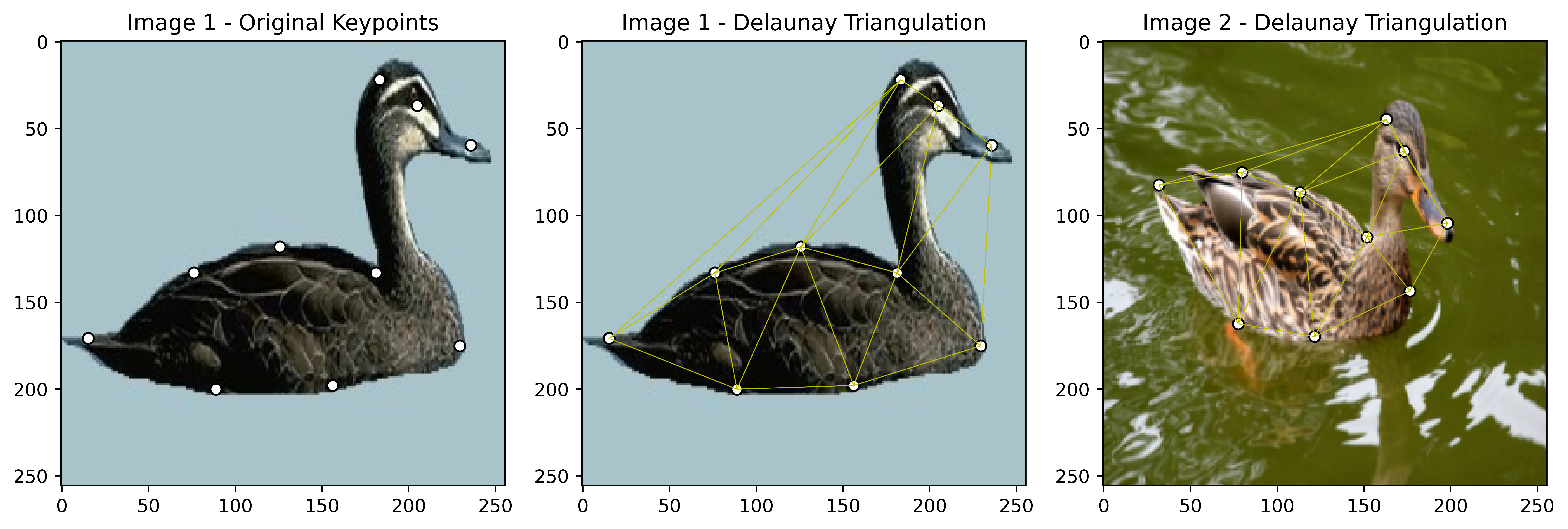
Fig. 6.1 Visualizing the Duck Images with Keypoints and Delaunay Triangulation#
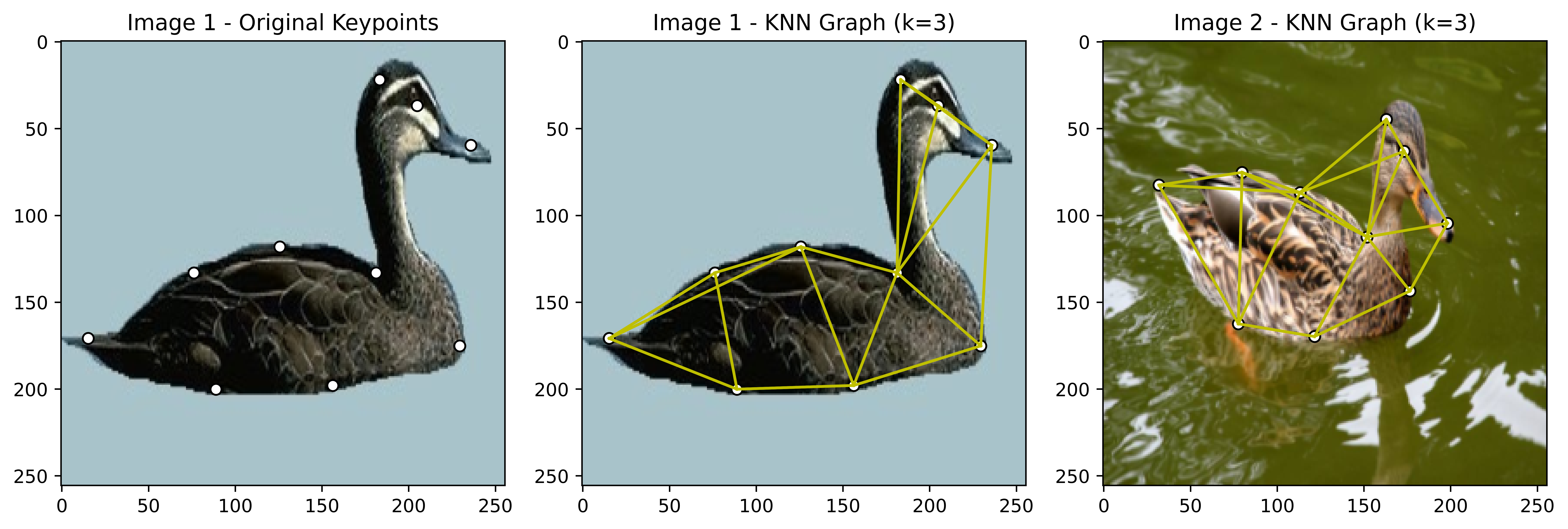
Fig. 6.2 Visualizing the Duck Images with Keypoints and k-NN Graph (k=3)#
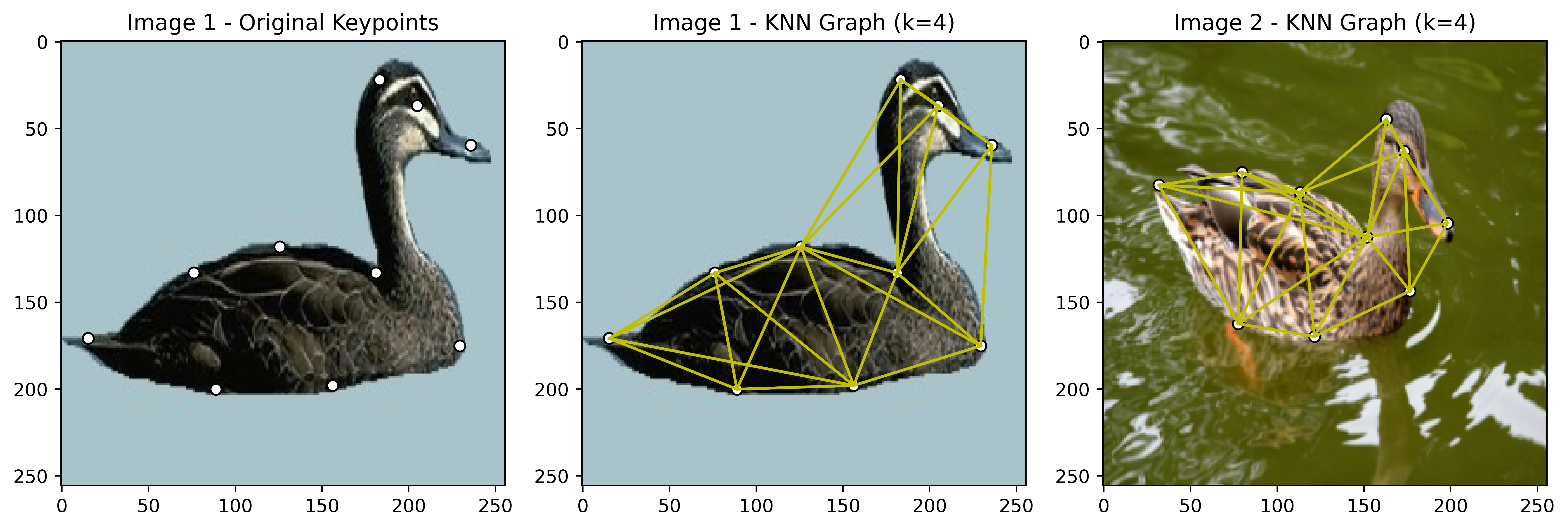
Fig. 6.3 Visualizing the Duck Images with Keypoints and k-NN Graph (k=4)#
6.1.4. Exercise#
In this session, we will extend our previous visualization work with the Willow-Object-Class Dataset by implementing and comparing different graph construction methods. You will need to create graph representations using both Delaunay triangulation and K-Nearest Neighbors (KNN) with varying k values.
Warning
The exercises involve multiple visualizations and graph construction methods. We strongly recommend creating reusable functions for:
Loading images and keypoints
Computing Delaunay triangulation
Computing KNN graphs with different k values
Plotting images with their corresponding graph structures This modular approach will make your code more maintainable and easier to debug.
6.1.4.1. Exercise 1: Delaunay Triangulation#
Load the Car, Face, Duck, Motorbike, and Winebottle images and keypoints from the Willow-Object-Class Dataset, at least 8 images, per category.
Implement the
delaunay_graphfunction to construct a Delaunay triangulation graph.Visualize the image with the Delaunay triangulation graph overlay, in a 2x4 grid.
In the end, you should have 8 images, each with the Delaunay triangulation graph overlayed.
6.1.4.2. Exercise 2: k-Nearest Neighbors (k-NN)#
Load the Car, Face, Duck, Motorbike, and Winebottle images and keypoints from the Willow-Object-Class Dataset, at least 8 images, per category.
Implement the
knn_graphfunction to construct k-NN graphs with varying k values (e.g., k=3, k=5, k=7).Visualize the images with the k-NN graphs overlayed, in a 2x4 grid for each k value.
6.1.5. Summary#
In this session, you learned about graph construction methods for matching keypoints in images. You implemented Delaunay triangulation and k-NN graph construction algorithms and visualized the graphs overlayed on images from the Willow-Object-Class Dataset. These graph representations will be used in the next session to perform graph matching and alignment tasks.